
If Your VNet Trusts Its Own Subnets, You Have a Security Problem

Anuradha
December 23, 2025 5 mins to read
Network Segmentation Strategy on Azure
🛡️ 🌐

Network Segmentation Strategy

Secure and Efficient Virtual Networks on Azure

As more organizations move to the cloud, it’s vital to have a strong network segmentation strategy.

Today I want to write about the basics of network segmentation on Azure. We will break down how to keep your virtual network secure and efficient by grouping related assets and isolating resources.

By implementing these best practices, you can build a secure foundation, protecting your organization’s assets and ensuring compliance with governance policies.

🔐

Why is Network Segmentation Important?

In today’s cybersecurity landscape, it’s wise to assume that breaches can happen. Network segmentation helps contain potential threats, protecting your information systems. By adopting a Zero Trust strategy, which focuses on user, device, and application identities, you can enhance your security and manage risks more effectively.

Key Benefits

  • Grouping related assets for better management.
  • Isolating resources to prevent unauthorized access.
  • Meeting compliance and governance requirements.
  • Limiting the impact of potential attackers.
0️⃣ 🤝

Adopt a Zero Trust Strategy

Learn More about Secure networks
🌐

Understanding Azure Virtual Networks

Azure Virtual Networks (VNets) act as your private network in the cloud. They provide isolation and segmentation, ensuring your resources are not exposed by default. While VNets are isolated bubbles, you can connect them using:

  • Virtual network peering: A low-latency, high-bandwidth connection to link VNets via the Azure backbone.
  • Azure VPN Gateway: A secure encrypted tunnel to connect VNets over the public internet.
🕸️

Using Subnets for Segmentation

Subnets are smaller networks within a VNet that help you organize and isolate resources. Some subnets have specific purposes, such as:

Gateway Subnet

Used strictly for VPN gateways. Must be named GatewaySubnet.

Azure Firewall Subnet

Dedicated for deploying Azure Firewall instances. Must be named AzureFirewallSubnet.

🔢

Reserved IP Addresses

When planning your subnets, remember that Azure reserves five IP addresses in every subnet for internal use. These cannot be assigned to your VMs.

The 5 Reserved IPs:

  • x.x.x.0 Network Address
  • x.x.x.1 Default Gateway
  • x.x.x.2 Azure DNS Mapping 1
  • x.x.x.3 Azure DNS Mapping 2
  • x.x.x.255 Broadcast Address

Security Features in Azure

🛡️

NSGs

Network Security Groups: Control inbound and outbound traffic at layer 3 and 4.

🏷️

ASGs

Application Security Groups: Simplify NSG management by grouping VMs logically.

🔥

WAF & Firewall

Offer advanced security with application layer protection (Layer 7).

🔒

Private Endpoints

Securely connect to PaaS services (SQL, Storage) via a private IP, removing public internet exposure.

🧭

User-Defined Routes

Control traffic paths within VNets. Force traffic through firewalls or appliances for inspection.

🌊

DDoS Protection

Mitigates large-scale attacks against public endpoints. Azure DDoS Protection Standard is recommended for critical apps.

🛠️

Defender & Policy

Azure Defender and Policy enforce security baselines, segment resources, and flag risky configurations in real time.

Hub-Spoke Network Topology

The recommended architecture for enterprise connectivity
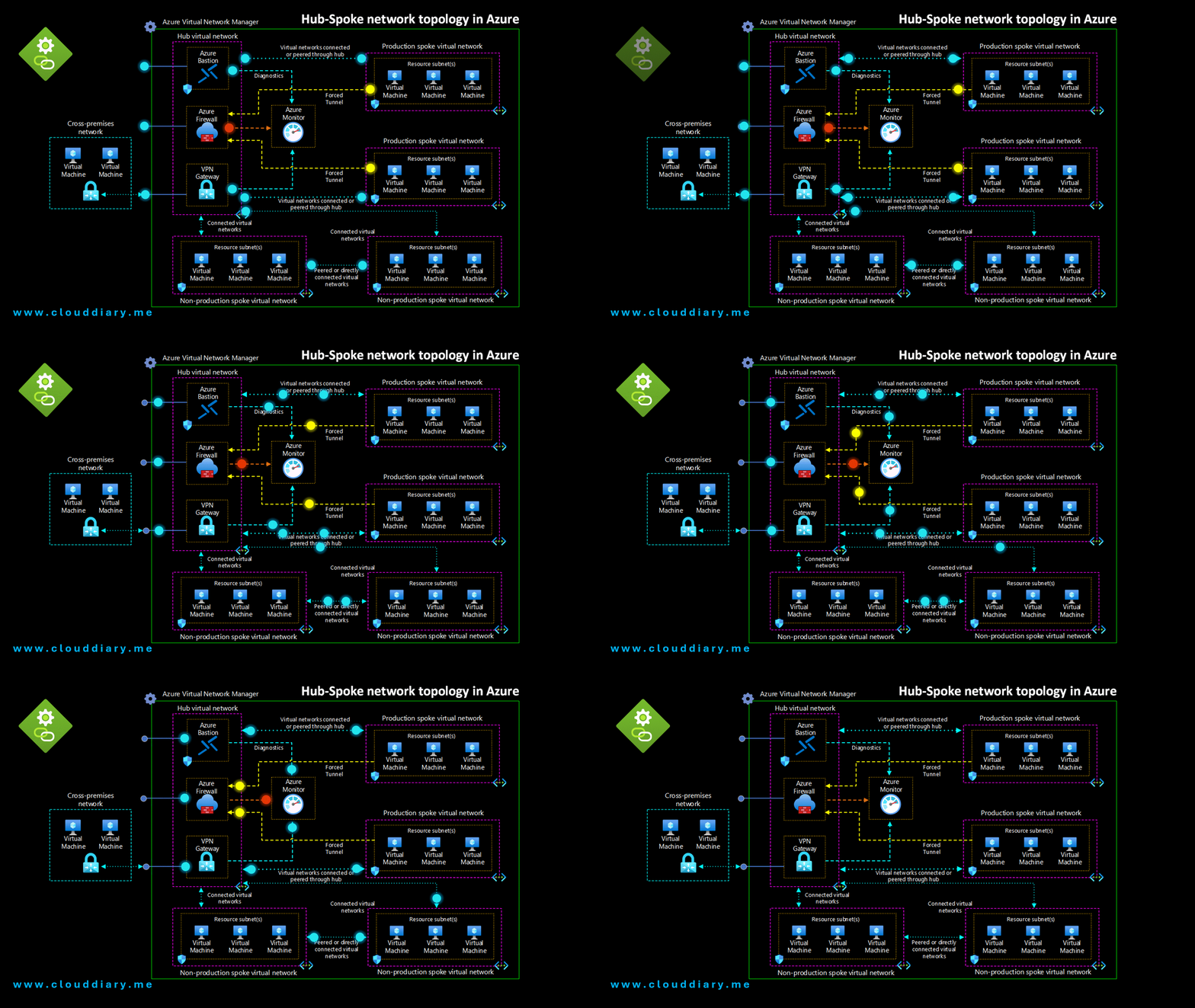
Hub and Spoke Diagram

Core Components

  • 🏢 Hub Virtual Network The central point of connectivity. It hosts shared services (like DNS, Bastion) and manages cross-premises connections.
  • 🏘️ Spoke Virtual Networks Used to isolate workloads. Each spoke can represent a different environment (Production, Dev) and connects back to the hub.
  • 🔗 Virtual Network Peering Low-latency connections that allow the Hub and Spokes to exchange traffic via the Azure backbone without a physical router.
  • 🚀 Pro Tip: Azure Virtual Network Manager For large environments, use AVNM to automate connectivity and security rules across multiple subscriptions globally.

Security & Access

  • 🏰 Azure Bastion Provides secure RDP/SSH connectivity directly from the Azure portal to your VMs using TLS, without exposing public IPs.
  • 🔥 Azure Firewall A managed firewall instance that sits in its own subnet within the Hub to inspect and filter traffic.
  • 🚪 VPN / ExpressRoute Gateway Enables connectivity to on-premises networks. This gateway typically lives in the Hub VNet.

Common Segmentation Patterns

Single VNet Multiple VNets (Peered) Hub & Spoke (Recommended)

clouddiary.me © 2025

Leave a comment

Your email address will not be published. Required fields are marked *

Share